
When words are hard, a look is enough.
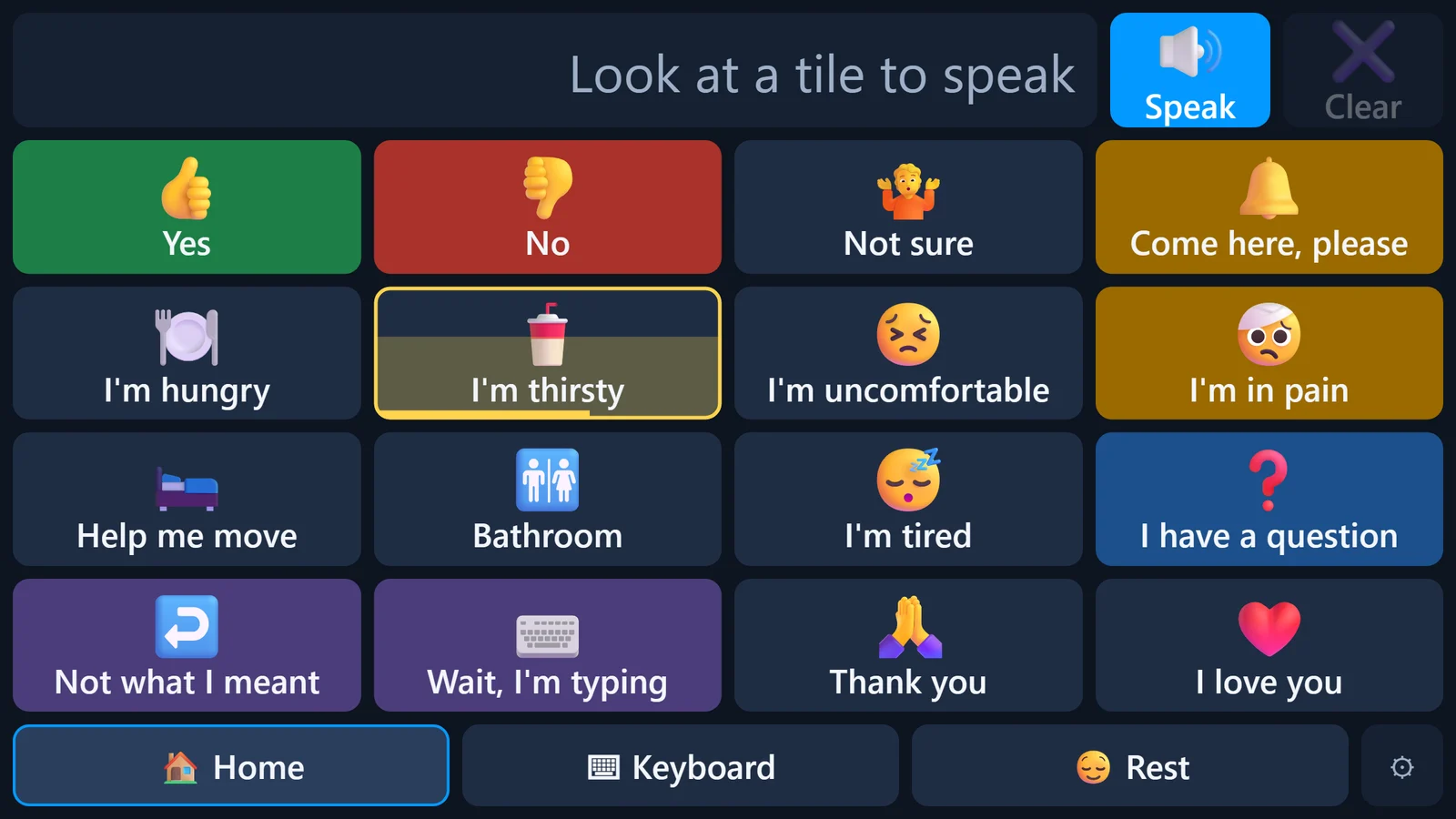
VoiceWRX turns a look at the screen into spoken words, in a warm, natural human voice. Choose a tile or spell anything, using only the eyes.
Set it up in minutes from any phone or computer.
How it works
Simple for them. Simple for you.
No reading manuals at the bedside. The board is ready the moment the screen turns on.
Look
The eyes rest on a tile or a letter. A soft fill shows it is being chosen, so nothing happens by accident.
Speak
VoiceWRX says it out loud in the voice you picked. Short phrases or whole sentences, spelled out on the keyboard.
Stay close
Family sees what is said on their phones, changes the board from anywhere, and gets an alert when they are needed.
Everything in one place
Built around the person using it.
Every part of VoiceWRX is designed to be used with the eyes alone: big targets, calm colors, and no small buttons to hunt for.
A human voice
Natural, lifelike voices, both male and female, so speaking sounds like a person and not a machine.
A keyboard that thinks ahead
Word predictions and suggested sentences mean fewer letters to spell, and it learns the words they use most.
Pictures they recognize
Choose from hundreds of pictures, or use your own photos of the people, pets and places they know.
Text the people they love
Write to family and friends with just the eyes, read their replies, and see the photos they send.
Help, one look away
"Come here, please" calls or texts the people caring for them and keeps trying until someone answers. Then the board tells them who is coming.
Keeps speaking
If the internet drops, the board keeps speaking. With the camera, video stays on the computer and is never sent anywhere.
Texting
Stay in touch, not just in the room.
The people who matter most do not have to be at the bedside to hear from them. VoiceWRX turns a look into a text message, and brings the replies back to the screen.
- Pick a person by their photoUp to 10 family and friends, chosen by the caregiver, each on their own big tile.
- Write with the eyesThe same keyboard, with predictions and suggested replies, and a check before anything is sent.
- Replies read aloud"Read it to me" speaks each message in a male or female voice that suits the person who wrote it.
- Photos come throughPictures from family show right in the conversation, full screen with one look.
- Only people on the listNobody else can text them. Caregivers turn texting on or off, and choose whether they can read the messages.
 Messages · now
Works with what you have
An eye tracker, the camera, or a touch.
Start with whatever is on hand, and calibrate it in a minute, right inside VoiceWRX.
Tobii eye trackers
Eye Tracker 5, 4C and EyeX. The tracker works only inside VoiceWRX, so it never takes over the rest of the computer.
The computer's own camera
VoiceWRX can follow the eyes with a built-in webcam. Best with large tiles and good light on the face.
Mouse, head mouse or touch
The same board works with any pointer, for people who can move a hand or the head.
For caregivers
You are never far away.
VoiceWRX sits on your phone's home screen like an app, with nothing extra to install.
- See what they say, as they say itA live view shows each phrase the moment it is spoken.
- They know you are comingTap "I'm on my way", press 1 on the call, or reply 1 to the text, and their screen shows and says it out loud: "Anna is on the way."
- Alerts that are hard to missWhen they need help, "Come here" can ring your phone with a real call or send a text, as well as a notification, and keeps trying until someone answers. Press 1 to say you are on your way.
- Change it from your phoneAdd tiles, people and pictures, or change the voice, from anywhere. Changes reach their screen in seconds.
- Their board, their wordsSet their name and pronouns, and the suggestions speak the way they would.
- A screen that runs itselfThe Windows app starts with the computer and opens full screen, ready to talk.
One simple plan
Everything included.
Set up the board first, then start the plan when you are ready to link their screen. Cancel any time.
- Natural human voices
- AI suggestions that finish sentences
- Texting with family and friends
- Help alerts by call, text and notification
- Tobii eye trackers, the camera, or touch
- The Windows app and the phone app for caregivers
Questions
Good to know.
What is VoiceWRX?
VoiceWRX is a comfort and communication tool. It turns a look at the screen into spoken words in a natural human voice and into text messages to family and friends. Caregivers set it up and change it from their phones.
Who is it for?
Anyone who finds speaking or typing hard but can read and look at a screen, and the family and caregivers who want to stay close to them.
Is VoiceWRX a medical device?
No. VoiceWRX is a comfort and communication tool. It is not a medical device, does not diagnose, treat or monitor anything, and is not a substitute for equipment or care a professional has recommended.
Can VoiceWRX call 911 or emergency services?
No. VoiceWRX cannot call 911 or any emergency number, and nobody at VoiceWRX watches for alerts. In an emergency, call 911 by other means. Make sure the person using VoiceWRX always has another reliable way to get help.
How do help alerts work?
Looking at "Come here, please" sends an alert to the caregivers' phones as a notification, and as a phone call or a text for each caregiver who chooses it. It keeps trying until someone answers "I'm on my way", and then the board shows and says who is coming, for example "Anna is on the way." Alerts are a convenience and can be delayed or fail, for example if the internet, power or a phone is off.
Can they make phone calls with VoiceWRX?
No. The only phone calls VoiceWRX makes are help alerts to the caregivers who asked for them. To reach anyone else, they can send text messages to the people a caregiver adds to their list.
What equipment do I need?
A Windows computer for the bedside, plus a Tobii eye tracker (Eye Tracker 5, 4C or EyeX), the computer's built-in camera, or a mouse, head mouse or touch screen. Caregivers use any phone or computer.
How much does it cost?
$69 a month per board, with everything included. You can set up the board before starting the plan, and cancel any time.
Is it private?
Yes. We do not sell personal information or show ads. Camera and eye tracker data stay on the computer. Messages stay private to the person using the board unless the board's owner lets caregivers read them. See the Privacy Policy.
A comfort tool, not an emergency service.
VoiceWRX helps people communicate and stay in touch. It is not a medical device and not a medical alert or emergency response system, and it cannot call 911. Alerts and messages can be delayed or fail, so always keep another reliable way to get help. See our Terms of Service.