
Text messages and calls
In short
- VoiceWRX sends text messages and automated calls only to people who asked for them.
- Message frequency varies. Message and data rates may apply.
- Reply STOP to stop texts at any time. Reply HELP for help, or email support@voicewrx.com.
- VoiceWRX never sends marketing texts, and no mobile information is shared with third parties or affiliates for marketing or promotional purposes.
What VoiceWRX sends
VoiceWRX is a comfort and communication tool that helps a person speak and text by looking at a screen. It sends three kinds of messages:
- Help alerts to caregivers. When the person using the board looks at "Come here, please", each caregiver who signed up for alerts gets a text and/or an automated phone call, repeated until someone replies 1 (or presses 1 on the call) to say they are on the way.
- Confirmation codes. A one-time code that proves a caregiver's phone number is really theirs before any alerts are sent to it.
- Messages the person writes. If a caregiver turns texting on, the person using the board can text the family members and friends the caregiver adds, and read their replies. These are personal, one-to-one conversations.
VoiceWRX is not an emergency service and cannot call 911. Alerts can be delayed or fail.
How people agree to receive them
Caregivers (alerts and codes)
A caregiver signs in to their VoiceWRX account at voicewrx.com, opens Phone calls and texts for alerts, enters their own phone number, chooses Call me, Text me or Both, and clicks Save. The consent statement is shown right above the Save button. VoiceWRX then sends a one-time code to that number, and nothing else is sent until the caregiver enters the code to confirm it. A caregiver can turn alerts off at any time on the same screen, or by replying STOP.
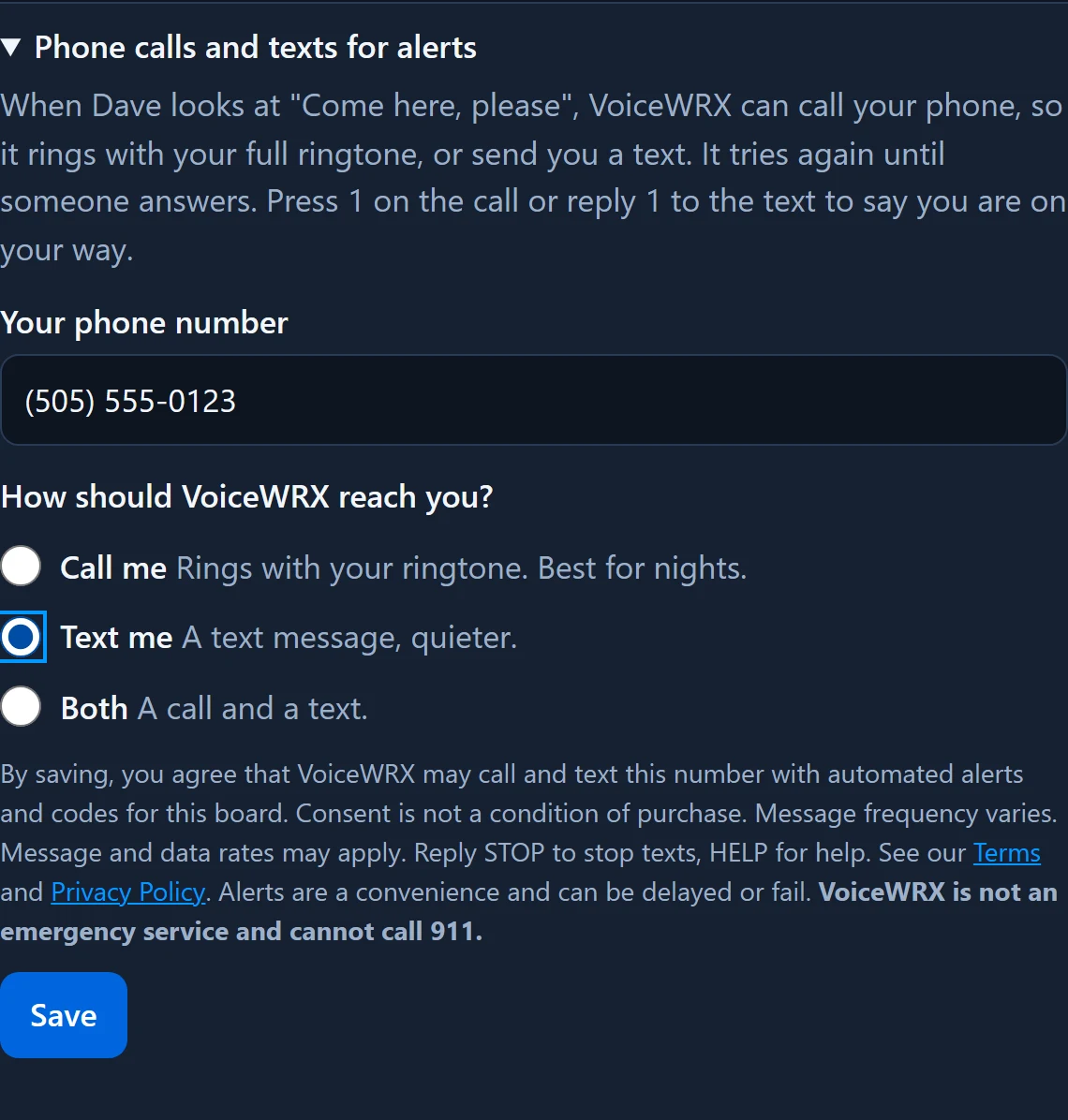
The consent statement reads:
"By saving, you agree that VoiceWRX may call and text this number with automated alerts and codes for this board. Consent is not a condition of purchase. Message frequency varies. Message and data rates may apply. Reply STOP to stop texts, HELP for help. See our Terms and Privacy Policy. Alerts are a convenience and can be delayed or fail. VoiceWRX is not an emergency service and cannot call 911."
Family and friends (messages from the person using the board)
Only people a caregiver adds to the board's list can receive these, and the caregiver confirms they know the person and have agreed to get texts. The first text to each person introduces the sender and explains how to stop: "Hey, this is Dave, texting you from my new app. Save this number so you know it's me. If you don't want to get texts from me, reply STOP."
Sample messages
Dave says: "Can you come here, please?" Reply 1 if you're on your way. - VoiceWRX
Your VoiceWRX code is 482913. It confirms this number for Dave's alerts.
This is a test from VoiceWRX. When Dave needs you, you'll get a text like this. Reply 1 to say you're on your way.
Stopping messages and getting help
- Reply STOP (or STOPALL, UNSUBSCRIBE, CANCEL, END or QUIT) to stop all texts from that number. Reply START to receive them again.
- Reply HELP for help, or email support@voicewrx.com.
- Caregivers can also turn alerts off on the caregiver site, and the board's owner can remove anyone from the texting list.
Carriers are not liable for delayed or undelivered messages. See our Terms of Service and Privacy Policy.